Last updated on 2 hours, 26 minutes ago.
This is one of the things that I did.
Custom Previous and Next Button
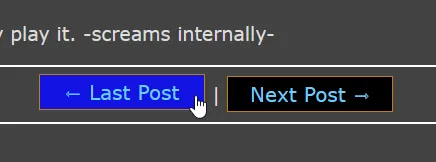
Previous Next in action.
The original embedded Previous Post and Next Post is from BearBlog's Anatomy of a Post doc.
This was inspired by James Zhan's version of "Previous/Next Post" being centralised instead of text alignment to the left.
Did you know you can customise it's Previous/Next post? And did you know you can add an "effect" when hover over the button? Did you know you can centralise it?
With this CSS code, you can!
Click this to view it's CSS:
CSS Code:
/* previous next */

a.previous-post, a.next-post {
    font-size: 0;
}

a.previous-post::before {
     content: "⇽ ";
     font-size: 20px;
}

a.previous-post::after {
    content: "Last Post";
    font-size: 20px;
}

a.next-post::before {
    content: "Next Post";
    font-size: 20px;
}

a.next-post::after {
    content: " ⇾";
    font-size: 20px;
}

a.previous-post , a.next-post {
    border: 1px solid;
    border-color: var(--border-color);
    background: var(--background-color);
    height: 30px;
    padding: 2px;
    width: 160px;
    display: inline-block;
    align-content: center;
}

a.previous-post:hover, a.next-post:hover {
    background: var(--hover-color);
    padding: 2px;
    position: relative;
    top: -2px;
}

main p:has(> a.previous-post), main p:has(> a.next-post) {
    text-align: center;
    margin: auto;
}
How to Use
In order to use this customised Previous/Next Post, you first need to have it embedded the original default {{ previous_post }} and/or {{ next_post }} for Bear into your (individual) posts. You can even add the default previous/next post via template (for future posts). Edit post template can be found in post tab on dashboard (<your blog>.bearblog.dev/<your blog>/dashboard/posts/).
And then copy the CSS code and paste it into Theme setting and viola. It'll then replace the default previous/next posts automatically. No action required other than making sure {{ previous_post }} {{ next_post }} is included in your blog post (and/or post template).
P.S: You can also replace the "Last Post" and "Next Post" within the CSS code if you want to call previous/next, something more unique.