Post was last modified on 1 day, 12 hours ago.
This is one of the things that I did.
Latest Status (Formerly called Field and Legend)
While I was looking around blogs while reading their posts... I came across a handful of blogs where they've had a latest status thing somewhere in their blog. Some has it on every page and some on the main page.
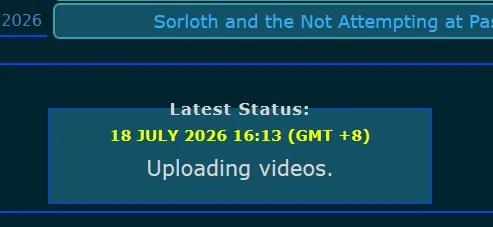
As an example from my own site.
It took me awhile to finally figure out how to do it. It's small, it's compact. You can use it if you plan to use it as a status, either per day or whenever you felt like updating it.
How to Use
So here is the code that made it happened.
Warning: Do note that this code only supports one status at a time. So you'll have to replace the text manually with a brand new one. More on that, down below.
Click this to view it's CSS:
CSS Code:
/* Fieldset Status */
/* Updated on 18 July 2026.*/

.fieldset {
    background: var(--background-secondary-color);
    max-width: 350px;
    border: 1px solid;
    border-color: var(--border-color);
    height: auto;
    margin: auto;
    padding-bottom: 2px;
    text-align: center;
    font-size: 21;
    color: var(--text-color);
}

.fieldset h4 {
    margin: 0;
    margin-bottom: -10px;
    padding: 0;
    font-size: 15px;
    font-weight: bold;
    color: var(--text-secondary-color);
    text-transform: uppercase;
    text-align: center;
}

.border-text {
    padding: 0 5px; /* Keeps the line away from text sides */
    font-weight: bold;
    font-size: 16px;
    color: var(--text-color);
    letter-spacing: 1.15px;
    margin-inline: auto;
}
With the code above applied in theme, you can now copy the markup html (right below) and paste it in the footer directory. In order to access the footer directory, you can access it by going into Settings > Header and Footer Directives. So, whenever you decide to update your status, you'll have to make your way directly to the footer directory that you placed and replace both the date and the text right below.
And yes, it uses <fieldset> and <legend> tag.
P.S: Do not touch or remove #### (and always leave a space between the 4 #'s and first word, eg #### Y) part whenever you're replacing the text or the header part will no longer work as intended.
Markup HTML:
Markup HTML:
<fieldset class="fieldset">
<legend class="border-text">Latest Status:</legend>

#### 12 July 2026
Here lies your status.

</fieldset>
Happy blogging!