Post was last modified on 22 hours, 20 minutes ago.
This is one of the things that I did.
Mini Info Box
Best suited for Desktop, iPad and Galaxy Tab viewing.
Warning:
If you do not have a monthly or lifetime subscription for your Bearblog, you are required to use external image hosting site to host your images. Eg. Imgur, Catbox Moe etc.
And use direct link (with image file format like .jpg, .png or .webp) at the end of the link.
This is my version of mini info box. Matches the theme of my blog.
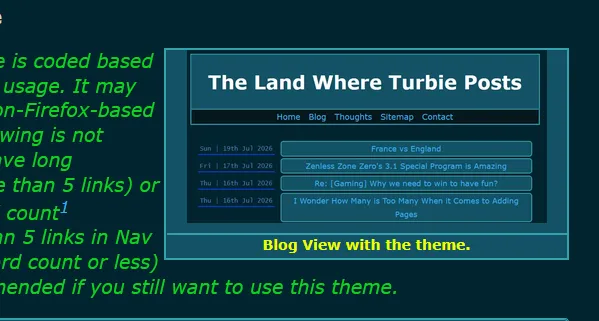
infobox placed on the right.
You can use it as additional text box or a image box. I have not tested with the video source, probably will never. This info box can help you with additional context, either by text (if you prefer not to use foot note) or images.
Image placed within the infobox are contained within the boundary. No pixels are lost and no edges are cut off.
Warning: Do not use this as a photo gallery. Use this only if you know how to adjust the basic css ratio stuff, bare minimum.
Additional warning: Unless you are experienced coder or have a tablet like iPad, the infobox might look like regular-sized box on your smartphone, depending on your mobile screen ratio.
P.S: You can use one
class_nameand change with the other code(s). But do note that it WILL apply to ALL previous info boxes that you may have strategise where you put your infobox to the paragraph previously.
Infobox on the right
This place the infobox on the right.
Click this to view it's CSS:
CSS Code:
.mini-info-box-right {
    border: 2px solid;
    border-color: var(--border-color);
    border-radius: 12;
    background: var(--background-color);
    float: inline-end;
    max-width: 500px;
    max-height: 700px;
    padding-inline-start: 0.125px;
    margin-inline-start: 5px;
    color: var(--text-color);
    text-align: center;
}

.mini-info-box-right img {
    width: 100%;
    height: 100%;
    object-fit: contain;
}

.mini-info-box-right h4 {
    color: var(--heading-color);
    text-align: center;
    font-size: 13px;
    margin-bottom: 4px;
    padding-top: 2px;
}
infobox in the middle:
This infobox is centralised.
Click this to view it's CSS:
CSS Code:
.mini-info-box-center {
    border: 2px solid;
    border-color: var(--border-color);
    border-radius: 12;
    background: var(--background-color);
    max-width: 500px;
    max-height: 700px;
    padding: 0.125px;
    margin: auto;
    color: var(--text-color);
    text-align: center;
}

.mini-info-box-center img {
    width: 100%;
    height: 100%;
    object-fit: contain;
}

.mini-info-box-center h4 {
    color: var(--heading-color);
    text-align: center;
    font-size: 13px;
    margin-bottom: 4px;
    padding-top: 2px;
}
Infobox on the left:
This place the infobox on the left.
Click this to view it's CSS:
CSS Code:
.mini-info-box-left {
    border: 2px solid;
    border-color: var(--border-color);
    border-radius: 12;
    background: var(--background-color);
    float: inline-start;
    max-width: 500px;
    max-height: 700px;
    padding-inline-end: 0.125px;
    margin-inline-end: 5px;
    color: var(--text-color);
    text-align: center;
}

.mini-info-box-left img {
    width: 100%;
    height: 100%;
    object-fit: contain;
}

.mini-info-box-left h4 {
    color: var(--heading-color);
    text-align: center;
    font-size: 13px;
    margin-bottom: 4px;
    padding-top: 2px;
}
How to Use
This is the markup.
Click this to view it's Markup HTML:
Markup HTML:
<div class="mini-info-box-">

  <img src="url-link" alt="your alt text" width="490" height="682">

 #### text.

</div>
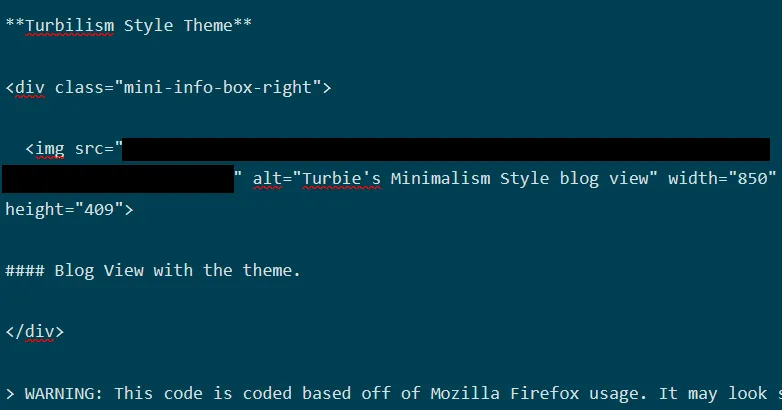
The url link is self explanatory. Alt basically meant text (for blind people). Width and height are explanatory. 850x409 where 850 is the width, and 409 is the height in this case.
You can copy the above html markup and paste it on any page/post you want. Preferably in between paragraph like it's shown in the picture.
All codes on this page, works with default bear theme. Or any theme that have basic call such as, border-color, background-color, text-color etc. Change accordingly if the words are shortened. Eg. background as bg.
Also, you can remove the <img src=""> line completely if you want to use it as a text box with a source link right below.
<div class="mini-info-box-right">

Main Text here.
#### [source link](https://bearblog.dev/)

</div>
I hope you have a great day or night. Happy blogging!