Post last modified on 3 days, 12 hours ago.
This is one of the things that I did.
Turbilism Full Theme
Past Update:
22 July 2026
Release.
WARNING: This code is coded based off of Mozilla Firefox usage. It might look slightly off in non-Firefox-based browsers. Mobile viewing is not guaranteed if you have long navigation bar (more than 5 links) or longer than 30-word count1 combined (if less than 5 links in Nav Bar). 4 Links (30-word count or less) in nav bar is recommended if you still want to use this theme.
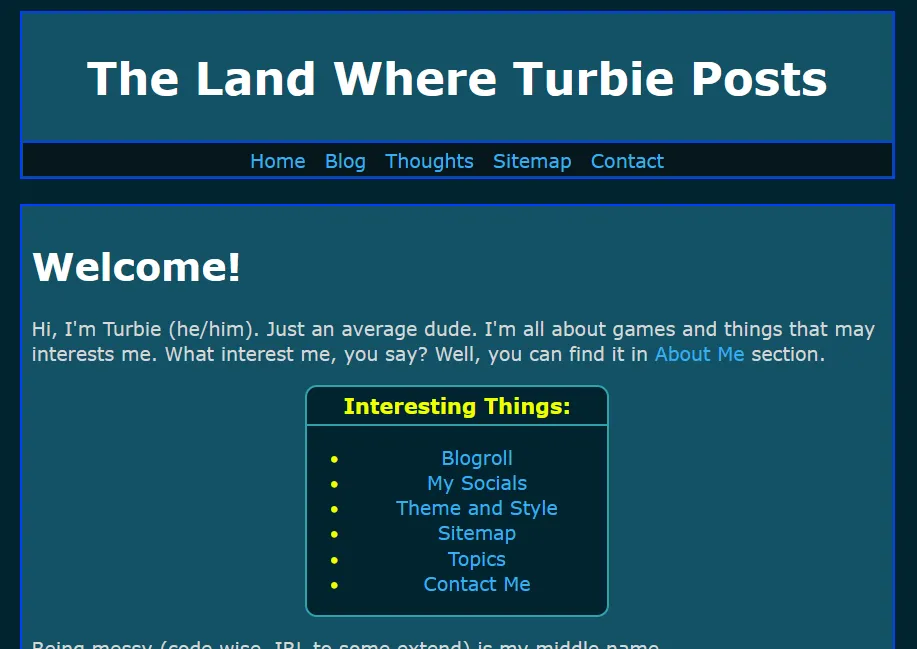
Turbilism Theme with main body filled.
My previous one, Turbilism Basic Style, do not have a secondary colour within the main body, just the main background colour. Looks great for people who wants to look for minimalist but still want to look slightly modern-ish header + nav bar.
For this full version, it has secondary colour to the main body. One small detail you might notice if you plan to try out both layout versions is, the nav bar's height on this full version is slightly smaller than the Basic Theme.
If you have class_name on your current theme, please read the class_name section.
And just like the basic version, it's built for Bearblog.
Both Turbilism versions are using default bear base codes. So you might recognise some of them as I have left it there by default.
Click this to view it's CSS:
CSS Code:
/* CSS made by turbiegaming.bearblog.dev. */
/* Layout Version 0.4.0 Updated on 22 Jul 2026. */

:root {
    --max-width: 875px;
    --line-height: 1.5;
    --font-main: Verdana, sans-serif;
    --font-secondary: Verdana, sans-serif;
    --font-scale: 19px;
    --background-color: #01242e;
    --background-secondary-color: #145266;
    --heading-color: #FFFFFF;
    --text-color: #D6D6D6;
    --text-secondary-color: #11D41E;
    --time-text-color: #57B848;
    --link-color: #37AFF0;
    --visited-color:  #AD00FF;
    --border-color: #0040FF;
    --border-secondary-color: #32A1AB;
    --hover-color: #052E3B;
    --hover-secondary-color: #006EA6;
    --nav-color: #06171C;
    --code-background-color: #000;
    --code-color: #BABABA;
    --blockquote-color: #ccc;
}

body {
    font-family: var(--font-secondary);
    font-size: var(--font-scale);
    margin: auto;
    padding: 20px;
    max-width: var(--max-width);
    text-align: left;
    background-color: var(--background-color);
    word-wrap: break-word;
    overflow-wrap: break-word;
    line-height: var(--line-height);
    color: var(--text-color);
}

header {
    background-color: var(--background-secondary-color);
    border: 2px solid;
    border-color: var(--border-color);
    border-width: 2.5px;
    max-width: var(--max-width);
}

h1, h2, h3, h4, h5, h6 {
    font-family: var(--font-main);
    color: var(--heading-color);
}

a {
    color: var(--link-color);
    cursor: pointer;
    text-decoration: none;
}

a:hover {
    text-decoration: underline;
    background-color: var(--hover-color);
}

nav {
    background-color: var(--nav-color);
    border-top: 2px solid;
    border-color: var(--border-color);
    height: 26px;
    margin: 1px;
    padding-top: 3.5px;
    padding-bottom: 4.7px;
}

nav p {
    margin: auto;
    padding: 2px;
    text-align: center;
}

nav a {
    margin-left: 1px;
    margin-right: 1px;
    padding: 5.5px;
}

nav a:hover {
    background-color: var(--hover-secondary-color);
}

strong, b {
    color: var(--text-color);
    font-weight: 1000;
}

button {
    margin: 0;
    cursor: pointer;
}

time {
    font-family: Lucida Console, monospace;
    font-style: normal;
    font-size: 17px;
    color: var(--time-text-color);
}

table {
    width: 90%;
}

hr {
    border: 1;
    border-top: 1px solid;
    border-color: var(--border-color);
}

img {
    max-width: 90%;
}

code {
    font-family: monospace;
    padding: 2px;
    background-color: var(--code-background-color);
    color: var(--code-color);
    border-radius: 3px;
}

blockquote {
    margin-left: 15px;
    border-left: 3px solid;
    border-color: var(--blockquote-color);
    color: var(--text-secondary-color);
    padding-left: 22px;
    font-style: italic;
}

footer {
    padding: 14px 0;
    margin: auto;
    text-align: center;
    font-size: 15px;
    line-height: 1.2;
    color: var(--text-secondary-color);
}

.title:hover {
    text-decoration: underline 3.5px;
    text-decoration-color: var(--heading-color);
}

.title h1 {
    font-size: 45px;
    border-color: var(--border-color);
}

.title {
    margin: auto;
    text-align: center;
}

.inline {
    width: auto !important
}

.highlight, .code {
    padding: 1px 15px;
    background-color: var(--code-background-color);
    color: var(--code-color);
    border-radius: var(--smol-radius);
    margin-block-start: 1em;
    margin-block-end: 1em;
    overflow-x: auto;
}

/* main body */
main {
    background-color: var(--background-secondary-color);
    margin-top: 25px;
    margin-bottom: 1px;
    padding: 10px;
    border: 2.5px solid;
    border-color: var(--border-color);
    position: relative;
    line-height: 1.3;
}

/* blog post list */
ul.blog-posts {
    list-style-type: none;
    padding: 3px;
    margin: 0;
    line-height: var(--line-height);
}

ul.blog-posts li {
    display: flex;
    padding-left: 2px;
    padding-bottom: 1px;
}

ul.blog-posts li span {
    flex: 0 0 210px;
}

ul.blog-posts li a:visited {
    color: var(--visited-color);
}

ul.blog-posts a {
    padding-left: 4px;
    padding-right: 4px;
    width: var(--max-width);
    text-align: right;
    margin: auto;
}

ul.blog-posts a:hover {
    background-color: var(--hover-color);
}
How to Use
Copy the code above and replace everything in Theme.
P.S: In order to make the theme fully workable, make sure you copy WITH the
:rootthat I included in the code above. I will be making individual palettes (like the Bear Blue colour that I used for both Turbilism theme) soon.
Class_Name
If you currently using any individual class_name and still want to retain/use it after using this theme, the easiest way is:
- save all the
class_nameinto a notepad (or notes app) and replace everything in there with this code. If you're editing directly on a smartphone (or mobile phone, depend on how you call it), or an Apple Tablet (or Galaxy Tab), make sure you "publish" (to save) first. This is to prevent accidental page reload2. - Then go into your notepad (or notes app) and copy the
class_nameyou have available and paste it back in. - Publish it to confirm.
P.S: I am not responsible for external
class_namethat isn't made by me. This is because their call tag (in:root) for colours like text, background etc may be different from mine.