Post last modified on 8 hours, 6 minutes ago.
This is one of the things that I did.
This is my version of minimalism style. It bears the bear colour. This theme is built for Bear Blog, easy on the eyes, easy readability on PC.
You can use your own colour schemes or mix with any CSS codes that you may come across. It's using bear colour scheme with a couple of extra blue palettes by default.
Turbilism Style Theme
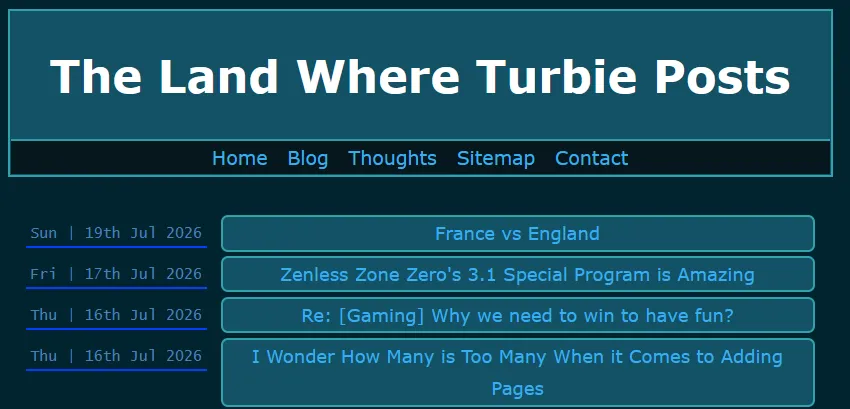
Blog View with the theme.
WARNING: This code is coded based off of Mozilla Firefox usage. It may look slightly off in non-Firefox-based browsers. Mobile viewing is not guaranteed if you have long navigation bar (more than 5 links) or longer than 30-word count1 combined (if less than 5 links in Nav Bar). 4 Links (30-word count or less) in nav bar is recommended if you still want to use this theme.
Click/Tap to view CSS:
CSS Code:
/* CSS made by turbiegaming.bearblog.dev. */
/* Layout Version 0.3.1 Updated on 20 Jul 2026. */

:root {
    --max-width: 875px;
    --line-height: 1.5;
    --font-main: Verdana, sans-serif;
    --font-secondary: Verdana, sans-serif;
    --font-scale: 19px;
    --background-color: #01242e;
    --background-secondary-color: #145266;
    --heading-color: #FFFFFF;
    --text-color: #D6D6D6;
    --text-secondary-color: #11D41E;
    --link-color: #37AFF0;
    --visited-color:  #AD00FF;
    --border-color: #0040FF;
    --border-secondary-color: #32A1AB;
    --hover-color: #052E3B;
    --hover-secondary-color: #006EA6;
    --nav-color: #06171C;
    --code-background-color: #000;
    --code-color: #BABABA;
    --blockquote-color: #ccc;
}

body {
    font-family: var(--font-secondary);
    font-size: var(--font-scale);
    margin: auto;
    padding: 20px;
    max-width: var(--max-width);
    text-align: left;
    background-color: var(--background-color);
    word-wrap: break-word;
    overflow-wrap: break-word;
    line-height: var(--line-height);
    color: var(--text-color);
}

header {
    background-color: var(--background-secondary-color);
    border-style: solid;
    border-width: 2.5px;
    border-color: var(--border-secondary-color);
}

h1, h2, h3, h4, h5, h6 {
    font-family: var(--font-main);
    color: var(--heading-color);
}

a {
    color: var(--link-color);
    cursor: pointer;
    text-decoration: none;
}

a:hover {
    text-decoration: underline;
    background-color: var(--hover-color);
}

nav {
    background-color: var(--nav-color);
    border-top: 2px solid;
    border-color: var(--border-secondary-color);
    height: 26px;
    margin: 1px;
    padding-top: 1.7px;
    padding-bottom: 5.1px;
}

nav p {
    margin: auto;
    padding: 1px;
    text-align: center;
}

nav a {
    margin-left: 1px;
    margin-right: 1px;
    padding: 5.5px;
}

nav a:hover {
    background-color: var(--hover-secondary-color);
}

strong, b {
    color: var(--text-color);
    font-weight: 1000;
}

button {
    margin: 0;
    cursor: pointer;
}

time {
 	font-family: Lucida Console, monospace;
    font-style: normal;
    font-size: 15px;
    color: var(--time-text-color);
    padding: 5px;
    border-bottom: 2px solid;
    border-color: var(--border-color);
}

table {
    width: 90%;
}

hr {
    border: 1;
    border-top: 1px solid;
    border-color: var(--border-color);
}

img {
    max-width: 90%;
}

code {
    font-family: monospace;
    padding: 2px;
    background-color: var(--code-background-color);
    color: var(--code-color);
    border-radius: 3px;
}

blockquote {
    margin-left: 15px;
    border-left: 3px solid;
    border-color: var(--blockquote-color);
    color: var(--text-secondary-color);
    padding-left: 22px;
    font-style: italic;
}

details {
    border: 1px solid;
    border-color: var(--border-secondary-color);
    border-radius: 4px;
    padding: 5px 5px 0;
}

details h4 {
    font-weight: bold;
    color: var(--heading-color);
    text-align: center;
}

summary {
    font-weight: bold;
    margin: -5px -5px 0;
    padding: 5px;
    border: 1px solid;
    border-color: var(--border-secondary-color);
    border-radius: 4px;
    background: var(--background-secondary-color);
}

details[open] {
    padding: 5px;
}

details[open] summary {
    border-color: var(--border-secondary-color);
    margin-bottom: 5px;
}

footer {
    padding: 14px 0;
    margin: auto;
    text-align: center;
    font-size: 15px;
    line-height: 1.2;
    color: var(--text-secondary-color);
    max-width: var(--max-width);
}

.title:hover {
    text-decoration: underline 3.5px;
    text-decoration-color: var(--heading-color);
}

.title h1 {
    font-size: 45px;
    border-color: var(--border-color);
}

.title {
    margin: auto;
    text-align: center;
}

.inline {
    width: auto !important;
}

.highlight, .code {
    padding: 1px 15px;
    background-color: var(--code-background-color);
    color: var(--code-color);
    border-radius: 3px;
    margin-block-start: 1em;
    margin-block-end: 1em;
    overflow-x: auto;
}

/* main body */
main {
    position: relative;
    padding: 10px;
    line-height: 1.3;
}

/* blog post list */
ul.blog-posts {
    list-style-type: none;
    padding: 5px;
}

ul.blog-posts li {
    display: flex;
    font-size: 18px;
    padding-top: 1.5px;
    line-height: 1.8;
    margin: 3px;
}

ul.blog-posts li span {
    flex: 0 0 195px;
}

ul.blog-posts li a:visited {
    color: var(--visited-color);
}

ul.blog-posts a {
    border: 2px solid;
    border-radius: 7px;
    border-color: var(--border-secondary-color);
    background-color: var(--background-secondary-color);
    padding-left: 4px;
    padding-right: 4px;
    width: var(--max-width);
    text-align: center;
    margin: auto;
}
ul.blog-posts a:hover {
    background-color: var(--hover-color);
}
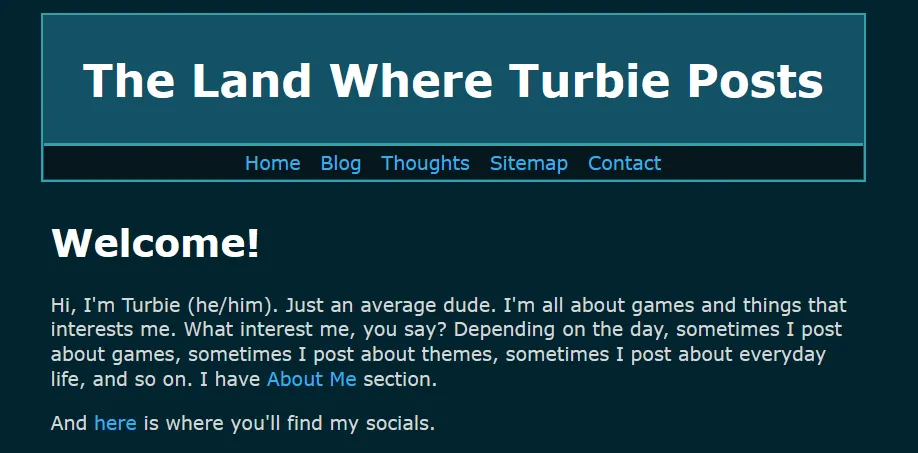
Home page view with the theme.
Most of the codes are available on the base default bear theme. So in theory, I didn't change much to the code except for adding a couple of things here and there to make it my style.
I hope you enjoy and happy blogging!
By 30-word count, I meant more like what was shown when viewing the blog, you can have your links as long as you want while in Nav -> dashboard/nav/...↩