Last updated on 8 hours, 17 minutes ago.
This is one of the things that I did.
Customise Toggle
The original <details></details> code is taken from Sylvia's. Same code can also be found at Mozilla's Developer Page site, and colouring it.
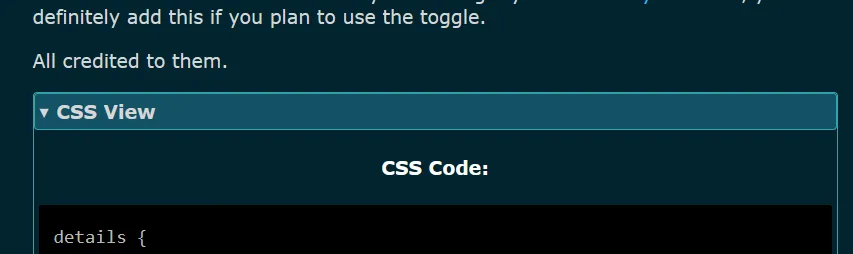
Toggle that is opened.
I have coloured it to match my theme. Also changed the "CSS Markdown:" to header version and centralise it. If you're using my Turbilism Style Theme, you can definitely add this if you plan to use the toggle.
All credited to them.
CSS View
CSS Code:
/*toggle hide/expand*/

details {
    border: 1px solid;
    border-color: var(--border-secondary-color);
    border-radius: 4px;
    padding: 5px 5px 0;
}

details h4 {
    font-weight: bold;
    color: var(--heading-color);
    text-align: left;
}

summary {
    font-weight: bold;
    margin: -5px -5px 0;
    padding: 5px;
    border: 1px solid;
    border-color: var(--border-secondary-color);
    border-radius: 4px;
    background: var(--background-secondary-color);
}

summary:hover {
    background: var(--hoover-color);
}

details[open] {
    padding: 5px;
}

details[open] summary {
    border-color: var(--border-secondary-color);
    margin-bottom: 5px;
}
How to Use
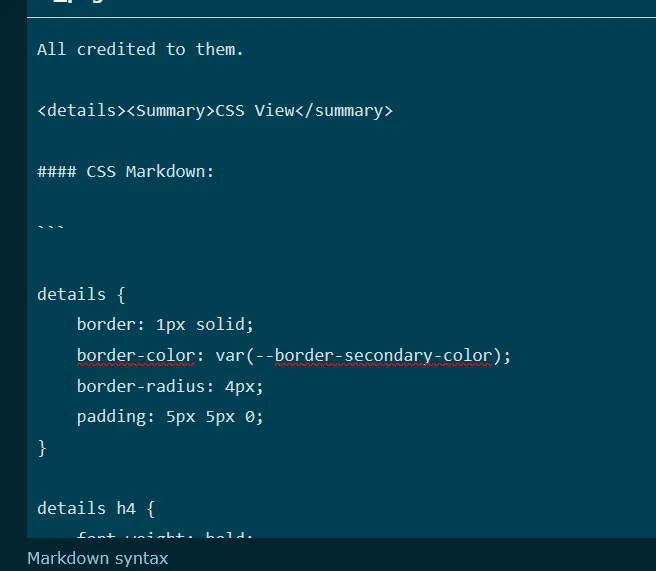
Where you replace the text while in editing mode.
Copy the code above to Theme settings and use the Markup HTML below and paste it into any page/post you want. Remember to replace the given sentence and use it accordingly.
Markup HTML
Markup HTML:
<details><Summary>CSS View</summary>

#### Anything here:
Context here.

</detail>